Showing posts with label SCCM 2012 Console Manual Installation methods. Show all posts

Friday, August 3, 2012

SCCM 2012 Console Manual Installation methods


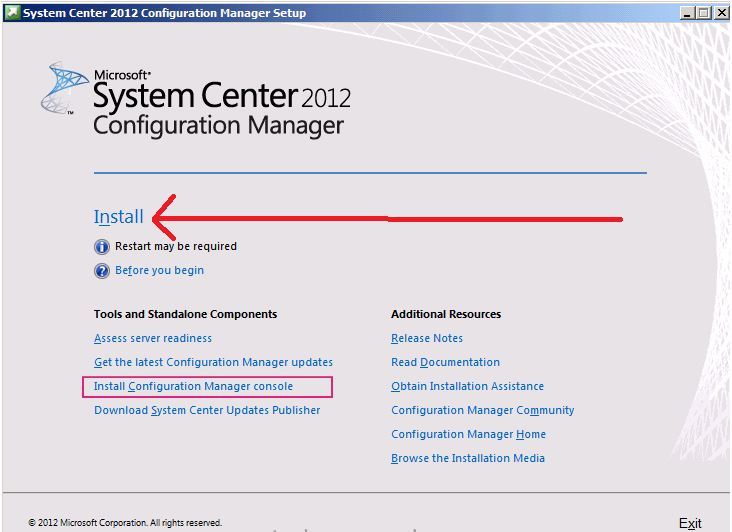
We can install Console from the SCCM 2012 installation Setup wizard or by using the stand alone tool - Consolesetup.exe


Let’s see the options


  1. As Shown below we have to enable the check box to get SCCM console installed along with SCCM installation.

 https://blogger.googleusercontent.com/img/b/R29vZ2xl/AVvXsEhzwiENFVYnrC5rs1QqtNOOdkfze0jv92HLdugme-ZgTq4pAqecpOWL-xwegtLiBYpC5JXbBCxxgUZKoGsOrcHYY5UsGITLJzkuOCJiwfgocKQAPV1dF7GArL2Gh2RbL4K0vWtSQIWfZc8l/s640/1.jpg


or


https://blogger.googleusercontent.com/img/b/R29vZ2xl/AVvXsEjehGtlyS56wbS2rBXjab79KVI58CeYZCxdCPXdvhlsrcY9SODjsblpE1HBVPNH8JRUVRFi8Dqin4hl3eptXOOE8zx5L-DfTF6vZpfdSS-wfA0HQzp1ZRinOjbl1Mel9kiKMPWZCVT2khxd/s640/2.jpg


2. in case if we miss to enable the above checkbox or if we need to install console in other PC’s then we have can use stand-alone tool called consolesetup.exe.


Prior to Console Installation make sure you have admin right on the computer and .net framework 4 is installed.


We can find stand-alone tool called consolesetup.exe in 2 locations


(1) From SCCM 2012 installation media files -  ConfigMgrSourceFiles>\smssetup\bin\I386

(2) From the site server - \tools\ConsoleSetup


Copy 2 files - AdminConsole.MSI file and ConsoleSetup.exe from any of the above mentioned location to local system (as shown below I coped it to folder D:\consolesetup).We can trigger the installation from any of the above file either exe or msi but I noticed ConsoleSetup.exe is better option because it created console installation log file in the location C:\ by default.


https://blogger.googleusercontent.com/img/b/R29vZ2xl/AVvXsEhxvhp_kcxeiRjmciOc0_WpDOx1BGUEZmiEzrOfq_WKXQVDpKl6xd2KUlyXYRQfNZafG16wSRtxHe6XMKAdRItvkYv_LZor1hQfEdIAaDTsEwU3nNgBARm9FQAz0VZnP8Sxe0VxTQA2UWNW/s400/3.jpg


Let’s start the installation using consolesetup.exe.


There are many switches that can be used for unattended installation. For more details refer - http://technet.microsoft.com/en-us/library/gg712320.aspx#BKMK_InstallConsole


Click Next...


https://blogger.googleusercontent.com/img/b/R29vZ2xl/AVvXsEgyTmuM2glHwGROF9VYP-8rRUyOkCD98p-Ki5oKVyIgSH_bMVbei8D24hePTYObrdkKQkkkAgM2WCYhuHof2BcQadOEyyq8xJ51pzgvSCjDLLaEEWMK52FgI58EPMnok6zoIcUXOZKquLaW/s400/4.jpg


As shown below Supply the FQDN of the SCCM site server to connect...Example – SCCM12.one.com


https://blogger.googleusercontent.com/img/b/R29vZ2xl/AVvXsEiq0yes_xGm67ujgFUJoaz9KgdU70wBJFIz2uMbuNXpxYv6sJ7s2ByHCwB_8EQjAOpYX29uJ38-GT0XdrQeFAhiBnTm8xgMqMHolBGoxcmx38DH7K4Z55z_cA4qFduFDMwcnASD5-wCW1l0/s400/5.jpg


Mention the installation path as show blow...


https://blogger.googleusercontent.com/img/b/R29vZ2xl/AVvXsEhyjEQeXqTssjU4c-s4tB6WovGoJto_CcVwMCG1wYpXJOJZzd74Y0qhE80JDECReqjtqqFeAJEvrWl-bsXnuZXmQ91ZKoQEVJ7eYiF2XQSlK8GnBfvm9jzrSic8v7X5Q3ky7Rx7bpR_0qua/s400/6.jpg


https://blogger.googleusercontent.com/img/b/R29vZ2xl/AVvXsEgKnoVqG5wF6I0hhvYn9ZK6VYra7LHKipaTOcXGA6pVHgCdRUJ0HqNlucnGEPBmXUMtlc-OxSO7uhvREU2mzvkRV2H98g6Npvg_QAAphyphenhyphenWV44C5xloy3K9n4C1abxk2mELagH9psla_2I9S/s400/7.jpg


https://blogger.googleusercontent.com/img/b/R29vZ2xl/AVvXsEibmiN1C2nYWJuZR5y6iaDPD7O1WFI042-Nn0h1J7K33CRcMAWxWD3V1_GdgdaTPNcce72JdLKcxcL677LaFdotxuldDiOOEbz4ZAjM2wLuM7mv6FxTRDi-2RurFGRFxuA0sVMGx6uQ9Mrh/s400/8.jpg


Troubleshooting logs:

SCCM console installation log can be found on C: \ drive - ConfigmgrAdminUISetup.log. This log will help to troubleshoot issues related to console installation.
 
https://blogger.googleusercontent.com/img/b/R29vZ2xl/AVvXsEgauD_JeeYs-WoWW0ygUOaQrLYlmvWTXtyyVqJTc6bMYD-YNv1uasCtQJt2TWShFUCl_46l3D9f85ck1F_RaIJWsCSydjp-DA0YeoDvLW2BV6i1HZtdsviKoSLXnTpweN8Yc5HTPHVsiNQC/s400/9.jpg


Most of the Issues with the SCCM console connectivity can be traced in the SMSAdminUI.log file. The SMSAdminUI.log file is located in the \AdminUI\AdminUILog directory. This Log will help to troubleshoot any SCCM console connectivity issue with Server.

https://blogger.googleusercontent.com/img/b/R29vZ2xl/AVvXsEhb1vd6_6W8a1XWC2moj-w9f10PfxT3y5dzMXk9nKz-_imqPk6G25nV26MR8Rn2JaemBH-jQ179ElBwu4P-d4Q2olGFsQY11RJnw0w4TORl9fSx1hR0VW9Wr5Ldmv7qmI04CkcXdNu_yvvv/s640/10.jpg